

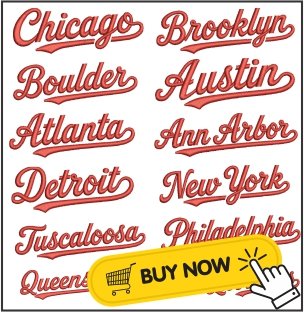
USA City Names Embroidery Design
USA City Names Embroidery Design
USA City Names Embroidery Designs are a great way to add a personal and stylish touch to your embroidery projects. Whether you love New York, Los Angeles, Chicago, Philadelphia, Kansas city, Austin or any other American city, these embroidery designs let you stitch your favorite place on clothing, bags, hats, jackets, towels and gifts.
These designs are perfect for travel lovers, sports fans, small businesses and anyone who wants to create unique embroidered items. Most USA city name designs are available in popular embroidery machine formats like PES, DST, EXP, HUS, JEF, VP3, VIP, PCS, SEW and XXX, making them compatible with many embroidery machines.
These formats work with many popular embroidery machine brands such as Brother, Janome, Baby Lock, Bernina, Husqvarna Viking, Singer and others.
Why Choose USA City Names Embroidery Designs?
City name embroidery designs are simple, modern and easy to stitch. They work well on many different fabrics and can be used for both personal and commercial embroidery projects.
Popular uses include: T-shirts, hoodies, jackets, caps, tote bags, backpacks, towels, travel gifts, souvenirs.
You can also combine city names with stars, flags or skyline designs to create a more attractive embroidery project.
PES vs DST File Format
Two of the most common embroidery file formats are PES and DST.
PES Format
- Mainly used by Brother and Baby Lock embroidery machines.
- Supports color information.
- Great for home embroidery users.
DST Format
- Works with many commercial embroidery machines.
- Contains stitch data but usually does not include color information.
- Widely used by professional embroidery shops.
Choosing the correct format helps your embroidery machine read the design correctly.
How to Resize Embroidery Designs
Resizing an embroidery design is possible, but it should be done carefully.
Keep these tips in mind:
- Resize only about 10–20% whenever possible.
- Use embroidery software instead of simply stretching the design.
- Large size changes may affect stitch quality.
- Always stitch a test sample before embroidering on your final product.
Proper resizing helps maintain clean stitches and smooth lettering.
How Many Stitches Are Too Many?
The number of stitches depends on the design size and level of detail.
Simple text designs usually have fewer stitches, while detailed logos and filled designs require more.
Instead of looking only at stitch count, consider:
- Fabric type
- Stabilizer
- Needle
- Thread quality
- Design density
A well-digitized design with balanced stitch density produces cleaner embroidery and reduces thread breaks.
Tips for Better Embroidery Results
Using the right embroidery techniques can make a big difference in the final result of your project. Always use high-quality embroidery thread and the correct stabilizer for your fabric to achieve clean, smooth stitches. Hoop the fabric tightly to prevent shifting during embroidery and replace dull needles regularly to avoid thread breaks and skipped stitches. Choose thread colors that closely match the original design and always stitch a test sample on scrap fabric before working on your final item. Also, avoid resizing the embroidery design too much, as it can affect stitch quality and detail. By following these simple tips, you can create neat, professional-looking embroidery every time.
Final Thoughts
USA City Names Embroidery Designs are a fun and creative way to celebrate your favorite American cities. They are suitable for clothing, accessories, gifts and personalized projects. Whether you are a beginner or an experienced embroiderer, choosing the right file format, using a compatible embroidery machine and following proper stitching techniques will help you achieve beautiful results.
If you are looking for high-quality USA City Names Embroidery Designs, choose professionally digitized files that support multiple embroidery machine formats. With the right design and careful stitching, you can create attractive embroidery projects that stand out.